
Cloud accounting integration is the automatic syncing of data between your accounting software and other business systems, including payroll, CRM, banking, inventory and payment platforms, so information updates across all of them without manual reentry. Faster financial insights, fewer manual duties, and seamless access to real time data are goals shared by many businesses. Nevertheless, successful cloud accounting integration is a prerequisite for accomplishing these goals. Integrating your accounting software with payroll, CRM, banking, and other company processes is now a competitive advantage as companies use more digital tools in 2026.
Cloud accounting integration can simplify processes and enhance decision making, but it also introduces additional concerns related to system compatibility, data security, and compliance. We will go over the advantages, possible drawbacks, and best practices in this guide to help your company integrate confidently.
What Cloud Accounting Integration Means for Modern SMEs
Connecting your cloud-based accounting software with other business apps, such payroll, CRM, banking, inventory management, payment platforms, and expenditure management tools, is known as cloud accounting integration. Information flows automatically between linked apps rather than having to enter the same data into several systems.
This translates into less human labor, fewer mistakes, and real-time financial data from a single source for contemporary SMEs. Integrated systems facilitate quicker business choices, increase efficiency, and improve accuracy whether you are processing invoicing, tracking cash flow, or producing reports.
The Business Benefits of Connected Finance Systems
By integrating your accounting program with other business apps, you can build a networked financial environment in which data is automatically transferred across systems. Financial decision-making becomes faster, more accurate, and of higher quality as a result of the reduction of human labor.
Real-Time Financial Visibility: Business owners can monitor cash flow, profitability, expenses, and key performance indicators (KPIs) without having to wait for manual reports thanks to connected systems’ rapid access to current financial data.
Reduced Manual Data Entry: Cloud accounting connection reduces redundant data entry and saves time by automatically syncing transactions between bank accounts, payroll, CRM, inventory, and payment platforms.
Improved Accuracy: Automated data transfers reduce human mistake, which leads to more trustworthy financial records, fewer reconciliation problems, and increased reporting confidence.
Faster Business Decisions: When it comes to budget management, cash flow forecasting, and future investment planning, business owners and finance teams can make well-informed decisions fast when they have access to reliable, up-to-date financial information.
Easier Compliance: Integrated finance systems facilitate the maintenance of well organised financial records, which makes it simpler to fulfil tax obligations, get ready for audits, and adhere to UK rules like Making Tax Digital (MTD), including MTD for Income Tax, mandatory from 6 April 2026 for sole traders and landlords with gross income over £50,000.
Better Collaboration: Cloud-based systems improve communication and facilitate quicker problem-solving by giving bookkeepers, accountants, and business owners safe access to the same financial data from any location.
Increased Productivity: Finance teams can spend more time on strategic initiatives that promote business growth and less time on administration by automating repetitive accounting chores.
Common Risks and Automation Errors in Cloud Accounting Integration
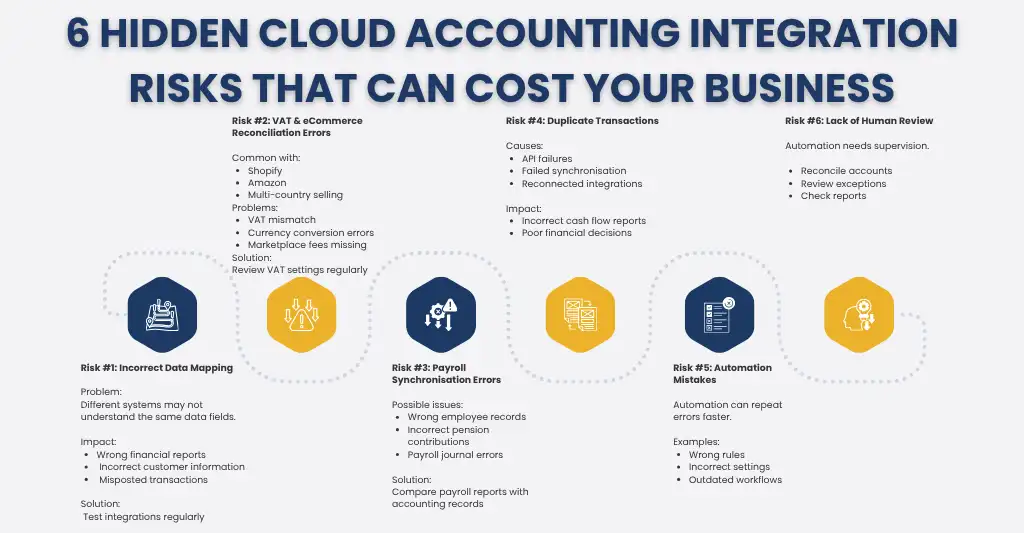
Although integrating cloud accounting can increase productivity and accuracy, there are some risks involved. Automation can propagate faults across several platforms before they are detected if systems are misconfigured or neglected. Businesses may keep accurate financial records and steer clear of expensive compliance difficulties by being aware of these typical dangers.
- Incorrect Data Mapping Between Systems: Every data field needs to be accurately mapped when integrating accounting software with CRMs, inventory systems, or payment platforms. Financial reports may be deceptive, client data may become erroneous, and transactions may be posted to the wrong accounts if the mapping is incorrect. Every time a new integration is implemented, testing and validation must be done on a regular basis.
- eCommerce VAT and Reconciliation Drift: Bookkeeping can be made easier for eCommerce companies that sell across several platforms and nations by integrating accounting software with marketplaces like Amazon or Shopify. Refunds, currency conversions, marketplace fees, and VAT rates don’t always line up, though. These discrepancies may result in incorrect VAT computations and reconciliation problems if they are not routinely reviewed.
- Payroll and Pension Synchronisation Errors: Although payroll interfaces can save a lot of time, wrong employee records, payroll journals, tax deductions, or pension contributions may be sent to the accounting system due to configuration errors. Before filing payroll or statutory returns, businesses should regularly check for inconsistencies between their accounting records and payroll reports.
- Duplicate Transactions and API Sync Failures: Transactions may sync multiple times or not at all when API integrations fail or rejoin unexpectedly. Financial reporting can be distorted and cash flow management impacted by duplicate invoices, recurring bank transactions, or missing sales data. Regular reconciliations and integration log monitoring aid in the early detection of these problems.
- Human Errors Hidden by Automation: Although automation minimises manual labor, human error is still a possibility. Inaccurate data can continue to be generated without anybody knowing due to improper setup, out-of-date rules, or unintentional changes to integration settings. To make sure their cloud accounting connection keeps working properly, businesses should do routine audits, evaluate automated workflows, and reconcile important accounts.
Why Errors Often Occur Between Xero, Shopify and Payroll Platforms
Financial processes can be streamlined by integrating platforms like Xero, Shopify, and payroll software, but these systems aren’t always properly matched. Because every platform has a unique data format, update schedule, and accounting logic, improper integration configuration may result in disparities.
Here are some of the most common reasons errors occur:
- Different data formats: Account mappings, product codes, and customer information could not match between systems.
- VAT configuration issues: Inaccurate VAT computations can be caused by incorrect tax settings, particularly for eCommerce companies that sell in several different jurisdictions.
- Changes to integration settings: Updating software, adding new applications, or changing procedures might unintentionally cause integrations to break.
- Timing differences: Temporary reconciliation discrepancies may result from sales, refunds, and payroll journals syncing at separate times.
- API limitations or sync failures: Duplicate transactions, missing entries, or delayed data transfers could result from transient connection problems.
- Manual overrides: Reconciliation may become more challenging if records are edited after they have synchronised.
What HMRC and Professional Bodies Expect in 2026
Regulators and professional associations continue to emphasize that automation needs to be supported by robust governance, reliable record-keeping, and human oversight as more companies use cloud accounting. Businesses are still in charge of making sure their financial records are accurate, comprehensive, and compliant even while technology can simplify accounting procedures.
Audit Trail Requirements
HMRC requires companies to keep a transparent and trustworthy audit trail that demonstrates the creation, processing, and modification of financial data. Every transaction, modification, and approval should be documented via integrated accounting systems to facilitate information tracing during audits, tax inquiries, and compliance checks.
PCRT and ICAEW Compliance Expectations
Even when employing automated accounting systems, professional accountants are expected to adhere to the ICAEW Code of Ethics and the Professional Conduct in Relation to Tax (PCRT) standards, both of which were updated for 2026: PCRT’s current edition took effect on 1 January 2026, and the revised ICAEW Code of Ethics came into force 1 July 2026. This includes making sure financial records are correct, upholding professional judgment, protecting customer information, and confirming that automated procedures yield dependable outcomes. Although it can help with compliance, technology cannot take the place of professional accountability.
Why Human Review Remains Essential
Automation can handle thousands of transactions in a matter of seconds, but it is not always able to spot odd trends, inaccurate VAT treatments, duplicate entries, or exceptions unique to a particular organisation. Frequent human assessments guarantee that financial reports are accurate, tax returns are compliant, and corporate decisions are supported by trustworthy data by identifying problems that automated systems could miss.
Cloud accounting integration and skilled accountants who routinely monitor, reconcile, and approve automated procedures are combined in the most efficient financial services. Businesses may lower risk while adhering to changing UK requirements by striking a balance between technology and human skills.
How to Audit Your Current Finance Setup
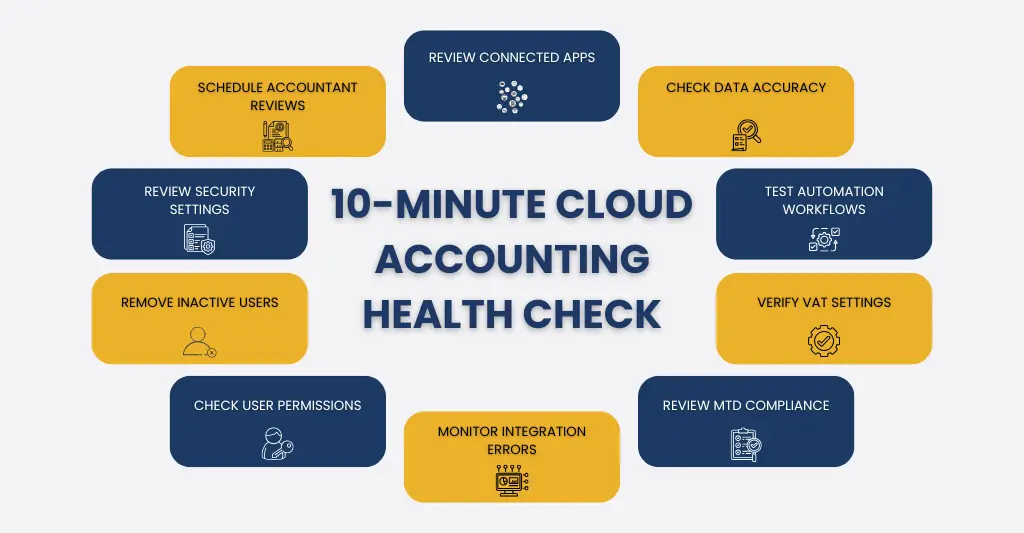
To make sure your cloud accounting integration is operating as planned, conduct a routine audit of your financial systems. Before they have an impact on your financial reporting or tax responsibilities, it enables you to detect data gaps, automated errors, and compliance issues.
Use this checklist to review your current finance setup:
Review Your System Integrations: Enumerate all the applications that are linked to your accounting software, such as payment gateways, banking, payroll, CRM, eCommerce platforms, and inventory systems. Verify that every integration is operational and synchronizing properly.
Check Data Accuracy: Verify that transactions, invoices, VAT, payroll journals, and customer records correspond by comparing important financial data across systems. Look into any disparities right away.
Test Automated Workflows: Examine the automation rules for processing payments, creating invoices, classifying expenses, and receiving bank feeds. Make sure they still correspond with the business procedures you already use.
Verify Compliance Settings: Make sure that payroll configurations, Making Tax Digital (MTD) settings, tax codes, and VAT rates are current with HMRC regulations.
Monitor Integration Performance: Examine integration logs and error reports for instances of duplicate transactions, delayed synchronisations, or unsuccessful API connections that could compromise reporting accuracy.
Schedule Periodic Professional Reviews: An expert accountant should regularly assess your financial setup, even with automated tools, to confirm data correctness, spot any hazards, and make sure your cloud accounting integration keeps supporting compliance and business expansion.
Review User Access and Permissions: Verify who has access to your accounting system and related programs. To safeguard critical financial information, remove inactive users and provide role-based access.
What Responsible Accounting Automation Looks Like
The goal of responsible accounting automation is to increase productivity without sacrificing financial management, accuracy, or compliance. Automation should assist financial teams by managing monotonous work while delegating important decisions and reviews to qualified experts, rather than taking the place of accountants.
Here’s what responsible accounting automation looks like:
Automates repetitive tasks: To cut down on manual labor, bank feeds, invoice processing, expense classification, and reconciliations are automated.
Includes human oversight: To identify mistakes that automation might overlook, qualified accountants routinely examine transactions, exceptions, and financial reports.
Keeps a transparent audit trail: All transactions, modifications, and approvals are documented, making it simple to track changes and promote compliance.
Protects financial data: Financial data is protected by multi-factor authentication (MFA), encryption, strong user permissions, and frequent security updates.
Supports regulatory compliance: Making Tax Digital (MTD), VAT, payroll, and record-keeping requirements are among the HMRC regulations that automated systems are set up to fulfill.
Scales with the business: Automation is adaptable enough to accommodate new software, higher transaction volumes, and evolving company requirements without interfering with daily operations.
Why E2E Accounting is the Preferred Choice
Selecting the appropriate software is not enough to successfully implement cloud accounting integration; you also need the necessary experience. At E2E Accounting, we assist companies in creating integrated financial systems that increase productivity while upholding accuracy, security, and compliance.
Here’s why businesses trust E2E Accounting:
- Experts in cloud accounting with knowledge of Xero, QuickBooks, Sage, Shopify, Amazon, and other top platforms.
- Smooth system integration across banking, eCommerce, accounting, payroll, CRM, and payment systems.
- Regular reconciliations and professional evaluation of automated procedures provide accurate financial reporting.
- Making Tax Digital (MTD), VAT, payroll, and statutory reporting are all supported by HMRC-compliant procedures.
- Dedicated accountants who keep an eye on your financial systems and fix problems before they affect your company.
- Whether you are a startup, SME, or multi-entity organisation, scalable solutions are made to expand with your company.
- Automation improves your finance function without compromising control or compliance thanks to technology supported by human skills.
We at E2E Accounting assist you in creating a finance function that is precise, compliant, and prepared for long-term expansion rather than just connecting your systems. Our staff is here to make sure your cloud accounting integration creates genuine business value, whether you’re moving to the cloud or optimising your current arrangement.
Conclusion: Moving from Automation to Validation
Cloud accounting integration, which offers increased productivity, real-time information, and faster workflows, has completely changed how firms handle their accounts. But automation isn’t sufficient on its own. The emphasis must change from merely automating procedures to verifying the accuracy, security, and compliance of the data that finance systems generate as they grow increasingly interconnected.
The most prosperous companies maintain accurate financial records that adhere to HMRC regulations by combining intelligent technology with skilled human control. Frequent checks, reconciliations, and proactive monitoring maximise the benefits of automation while preventing expensive mistakes.
E2E Accounting can assist you in optimising your cloud accounting integration. Our cloud accounting experts make sure your finance systems are entirely compliant, effortlessly linked, and backed by knowledgeable experts, providing you the assurance to expand your company with reliable, accurate financial data.
FAQs: Frequently Asked Questions
What are the biggest cloud accounting integration risks?
Inaccurate data mapping, duplicate transactions, API sync failures, payroll and pension mistakes, erroneous VAT calculations, and reconciliation discrepancies are the main dangers associated with cloud accounting integration. Automation minimises manual labor, but system malfunctions or configuration problems can propagate faults across several platforms. To keep your financial data accurate and compliant, regular reconciliations, system monitoring, and human review are crucial.
How does automation bias affect my tax filings?
When people believe automated systems are always accurate and neglect to examine the outcomes, this is known as automation bias. This may result in duplicate entries, misclassified transactions, inaccurate VAT computations, or missing income being reported in your tax returns. To confirm automated data and make sure your tax returns are correct and in compliance with HMRC regulations, regular human inspection and reconciliations are crucial.
Why does my accountant need to review my integration setup?
By verifying data correctness, examining automation rules, balancing transactions, and spotting problems that software might overlook, an accountant makes sure your cloud accounting connection is operating properly. Additionally, they help avoid costly compliance difficulties, VAT errors, and reporting errors by confirming that your finance systems adhere to HMRC regulations. Your interconnected systems remain dependable, secure, and accurate with regular reviews.
Are Xero and Shopify sync errors common?
Sure. Incorrect settings, API malfunctions, or problems with data mapping can all cause Xero and Shopify sync troubles. Duplicate transactions, missing sales, inaccurate VAT, and reconciliation discrepancies are common issues. Frequent reviews help identify these problems early.
How does the 2026 ICAEW Code of Ethics impact my software choice?
Although specific accounting software is not mandated by the 2026 ICAEW Code of Ethics, accountants are expected to adopt solutions that promote accuracy, data security, transparency, and compliance. Instead of depending only on automation, your program should offer trustworthy records, preserve a transparent audit trail, and permit suitable human monitoring.
Can human-in-the-loop accounting save me money?
True. Human-in-the-loop accounting helps find mistakes before they become expensive by combining automation with expert evaluation. This can lower the risks associated with compliance, eliminate payroll and VAT errors, enhance reporting accuracy, and save money by preventing fines, rework, and poor financial decisions.
What should I look for when auditing my current tech stack?
Examine your integrations for user permissions, VAT settings, duplicate transactions, accurate data syncing, API faults, and reconciliation problems. Additionally, make sure your software is safe, current, and complies with HMRC regulations.
