

Amazon payments confuse many UK vendors. You see solid sales on your dashboard, but the money in your bank is less, arrives late, and rarely matches your expectations.
That’s because Amazon doesn’t just pass over your sales total. It deducts costs, reserves funds for any refunds or chargebacks, and then pays out on its own schedule, not yours. When you don’t understand this, it’s simple to miscalculate profit, run into cash flow issues, and fall behind on bills and VAT.
In this article, we will explain in simple words how Amazon seller payouts work, why so many UK sellers get them wrong, and what you can do to prevent common mistakes.
How Does Amazon Calculate Your Payout?
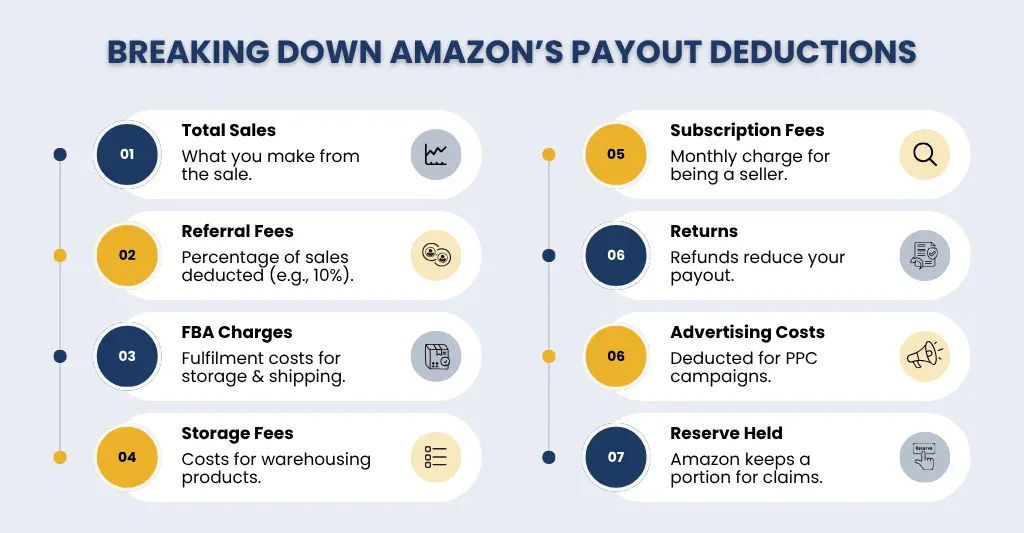
Amazon does not simply pay you the whole amount of your sales. Your payment is calculated after a series of deductions and adjustments. It begins with your total sales for the period, from which Amazon deducts different fees such as referral fees, fulfilment (FBA) charges, storage expenses, and subscription fees. In addition, any refunds or returns are taken, as is your advertising budget if you run Amazon ads.
In some circumstances, Amazon keeps a reserve amount to cover any returns or claims, so not all of your profits are released immediately. In addition, timing is important; some orders may still be delayed due to delivery confirmation or settlement cycles. As a result, the final payout is the balance left after all of these deductions, not your total sales.
Think Sarah, a small UK business owner selling eco-friendly crockery on Amazon. Last month, her total sales were £5,000. That sounds fantastic, doesn’t it? However, her Amazon payout does not include the whole £5,000.
Here’s how it works: Amazon deducts £500 in referral fees, £700 in FBA fulfilment charges, £100 in storage fees, and £25.00 in monthly subscription fees. She also received £200 in returns after spending £150 on advertising. Amazon keeps a £300 reserve to cover potential claims in the future.
After all of these deductions, Sarah’s compensation is £3,025, rather than the original £5,000. This demonstrates the importance of understanding each fee, reserve, and settlement time when managing cash flow and planning expenses.
Want to simplify your Amazon finances? Dive deeper into managing your Amazon sales, fees, and FBA costs with our Complete Guide to Amazon Bookkeeping.
Why Is My Amazon Payout Lower Than Expected?
- Amazon fees are deducted first: Amazon charges a variety of fees, including referral fees (a percentage of each sale), FBA fulfilment expenses, storage fees, and monthly membership rates. These are automatically deducted before you receive your payout, making the total amount appear less than planned.
Suppose Sarah’s sales profit is £5,000, then how much payment will she receive?
| Item | Amount |
| Total Sales | £5,000 |
| Referral Fees (10%) | £500 |
| FBA Fulfilment | £700 |
| Storage Fees | £100 |
| Subscription | £25 |
| Returns & Refunds | £200 |
| Final Payout | £3,475 (before taking into account – ad fees and reserves) |
- Returns and refunds reduce your earnings: Customers who return things or request refunds have that amount taken from your balance. Even if the transaction took place earlier, the refund can affect your current payout cycle.
For example, Sarah sold a set of eco-friendly mugs for £100 last month, but one client returned the order and received a complete £20 refund. Even though the initial sale occurred the prior week, Amazon deducts the £20 return from her current compensation. This means that her total monthly payout is lowered, demonstrating how returns and refunds have a direct impact on Amazon seller payouts.
- Advertising costs are included: If you run Amazon PPC ads, the ad budget is withdrawn immediately from your seller account. This can dramatically limit your payment, particularly if campaigns are not carefully watched.
| Item | Amount | Reason |
| Total sales | £100 | Eco-friendly mugs sold |
| Advertising Cost (PPC) | £50 | Deducted automatically by Amazon |
| Adjusted Payout | £50 | Amount received after ad spend |
- Amazon holds a reserve amount: Amazon may set aside a percentage of your payments as a reserve for any returns, chargebacks, or claims. This means that even if the transaction is completed, not all of your cash will be released immediately.
| Item | Amount | Reason |
| Total sale | £100 | Eco-friendly mugs sold |
| Reserve Held by Amazon | £ 20 | Set aside for potential returns or claims |
| Payout Released | £80 | Amount available immediately |
- Not all orders are paid instantly: Some orders remain in the “pending” category until they are delivered and confirmed. Until then, the proceeds from these sales are not included in your compensation.
Example: Sarah sold the mugs for £100, but £30 is still pending delivery confirmation. Amazon only pays the confirmed £70 currently, showing that not all sales are paid immediately.
- Payout timing differences: Amazon pays its vendors in cycles (typically every 14 days). Sales made close to the payout date may not be included and will be carried over to the next cycle, creating uncertainty.
Example: Sarah sold £200 in mugs two days before Amazon’s payment cycle finished. Because Amazon pays every 14 days, this sale is not included in the current payout and will be carried over to the following cycle. This demonstrates how payout timing can cause brief pauses in cash flow.
Struggling with Amazon payouts? See how ERP integration can streamline your finances in our From Amazon to ERP: Turning eCommerce Data into Actionable Insights – blog.
When Do Amazon Payouts Land – And How to Plan Your Cash Flow?
Amazon pays vendors every 14 days, but the money doesn’t always arrive when you anticipate. Payments are based on a settlement cycle, and only delivered and cleared orders are considered. This means that some of your recent sales may still be waiting and will be added to the next payout.
In addition, your bank may take 2-5 working days to finalise the transfer after Amazon releases the funds. So, even once a payout is initiated, there may be a wait before the money reaches your account.
How to Plan Your Cash Flow?
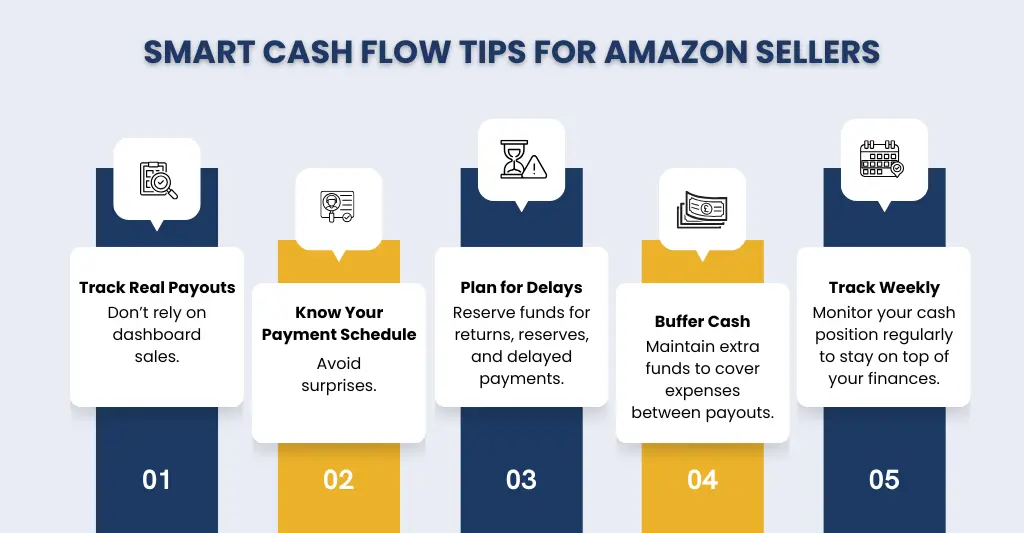
- Don’t rely on sales numbers: Plan based on actual payouts, not the overall revenue displayed on your dashboard.
- Track your payout schedule: To avoid surprises, be sure you know your settlement dates and projected payment timescales.
- Account for delays and reserves: Always assume that a percentage of your funds will be delayed or held back.
- Keep a cash buffer: Maintain sufficient funds to meet expenses such as advertising, stock, and operations between payout cycles.
- Monitor weekly cash position: Regular tracking keeps you in control and prevents unexpected shortfalls.
Who Is Affected Most – And Where UK Sellers Go Wrong?
- Fast-growing Amazon sellers: When sales increase quickly, it becomes more difficult to track fees, refunds, and cash flow. While growth appears to be healthy, profitability and cash flow are not keeping up. (To get a clearer picture of where your margins are slipping, check out our Ecommerce Management Reporting guide to understand how to track and improve your profitability.)
- Sellers heavily investing in ads: High PPC spend without good tracking reduces margins, making payouts appear smaller than intended.
- FBA sellers with complex costs: Storage fees, delivery charges, and returns add additional costs that are sometimes underestimated.
- Multi-channel eCommerce businesses: Sellers who use Amazon in addition to Shopify or eBay find it difficult to determine overall profitability without unified statistics. Learn how eCommerce-specialised accountants can help.
- New sellers without financial systems: Many newcomers rely solely on Amazon dashboards, which do not provide a comprehensive financial picture.
Where to Find and How to Reconcile Your Settlement Report?
For UK Amazon sellers, your settlement report is the most significant document for determining how much money comes in and goes out of your firm. It displays sales, fees, refunds, reserves, and the final payout from Amazon – essentially your financial reality.
Where to Find Your Settlement Report?
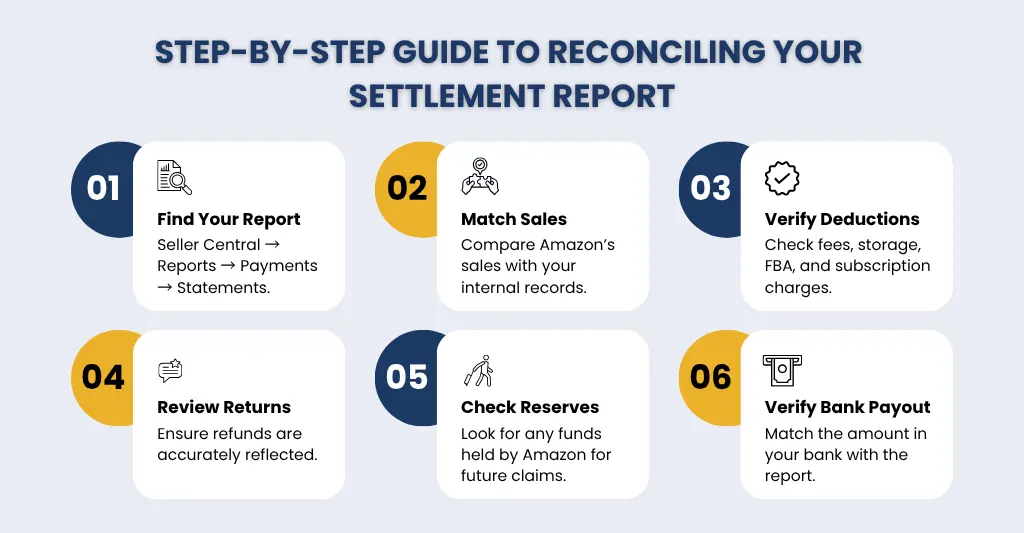
- Log in to Seller Central: Use your credentials to log in to your Amazon Seller Central account. This is the central location for all your Amazon selling activity, including payments and financial reports.
- Navigate to Payments: Once logged in, go to the top menu and click on Reports → Payments → Statements (Settlement Reports). This section contains all your settlement reports for previous payout cycles.
- Select the relevant date range: Amazon allows you to obtain reports for certain time periods. Choose the start and end dates that correspond to the payout cycle you want to reconcile. Most merchants utilise biweekly or monthly cycles for convenience.
- Download the report: Settlement reports are typically provided in CSV format, making them simple to open in Excel, Google Sheets, or your accounting program. The report contains sections for total sales, shipping credits, FBA fees, referral fees, advertising expenses, refunds, and reserves.
- Check the payout summary: The report will have a summary at the top that displays the total gross sales, total deductions, and net payout amount. This is the amount that Amazon will transfer to your bank account, less any pending funds.
How to Reconcile Your Settlement Report?
- Match total sales with internal records: Compare the total sales reported by Amazon to your internal sales ledger. Ensure that every order is accounted for and that the totals match your records. If there are any disparities, look into missing orders or unprocessed transactions.
- Verify all fees and deductions: Check all deductions. Amazon has imposed referral fees, FBA fulfilment fees, storage expenses, subscription fees, and any other fees. Make sure these match your expectations and rate structures.
- Review refunds and returns: Refunds are removed from your payout, typically after the original sale has been recorded. Compare refunds in the settlement report to your internal records to confirm that all returns are properly reflected.
- Check reserve amounts: Amazon may reserve a percentage of your profits to cover any claims or refunds. Determine the reserve in the report and the conditions for its release.
- Match payout to bank deposit: The net payout stated in the settlement report should be the same as the amount deposited in your bank account, allowing for the typical processing time of 2-5 working days. If it doesn’t, look into probable delays or missed transactions.
- Identify differences and errors: If your reconciliation reveals discrepancies, investigate deeper. Check for unrecorded refunds, delayed reimbursements, improper fee calculations, and outstanding orders. Keeping a thorough record helps to avoid cash flow surprises.
- Integrate into your accounting system: Once reconciled, update your accounting program or spreadsheet with accurate data. This assures that your profit and loss statements, cash flow, and tax returns are correct.
Should You Use Software or a Specialist Accountant for Amazon Payouts?
Managing Amazon payments may be difficult, and many UK sellers struggle to decide whether to use software or work with a professional accountant. Software options include automated tracking, rapid reports, and interaction with Amazon and accounting platforms, making them ideal for basic monitoring. They frequently fall short in understanding complex deductions, reserve holdings, and multi-channel profitability.
On the other hand, a specialist accountant has a thorough understanding of Amazon fees, refunds, reserves, and settlement cycles. They can precisely balance payouts, provide actionable insights, and assist you in effectively planning cash flow, decreasing the possibility of costly mistakes.
While employing an accountant may be more expensive than purchasing software, the benefits of clarity, time savings, and business protection typically make it a good investment. A qualified accountant ensures accuracy and provides confidence in financial decisions, especially for UK sellers with expanding or more complex Amazon operations
Conclusion
Amazon payouts can be confusing because what appears in your bank account is rarely the same as your total sales. Fees, refunds, advertising charges, reserves, and time discrepancies all contribute to the final total. Many UK sellers struggle because they rely solely on dashboards or fail to balance their settlement data correctly.
Visibility and accuracy are critical for avoiding unexpected cash flow. Whether you use specialised Amazon accounting software or a reputable eCommerce accountant, understanding your payouts and analysing your net earnings is critical for making informed business decisions, planning cash flow, and developing economically on Amazon. Clear reporting transforms confusion into control, ensuring that your hard-earned sales actually benefit your company.
Why Consult E2E Amazon Accountants?
Navigating Amazon payouts and calculating genuine revenue can be difficult for UK vendors. E2E Amazon Accountants specialise in balancing payouts and tracking all fees, refunds, reserves, and advertising expenditures, providing you with a complete and accurate picture of your financial flow. Our experience guarantees that your financial reporting is accurate and that we deliver actionable insights at both the product and channel levels.
In brief, E2E helps you understand your true earnings by transforming complex Amazon finances into clear, decision-ready data.
People Also Ask:
How often does Amazon pay out to UK sellers?
Amazon pays UK merchants bi-weekly (every 14 days) by default. Payments consist of completed sales minus fees, refunds, advertising expenditures, and reserve holds. Note that some orders may stay pending until delivery is confirmed, thus not all sales will display in the same payout cycle.
Why does Amazon hold some of my money in reserve?
Amazon keeps a percentage of your funds in reserve to cover future refunds, returns, chargebacks, or claims. This ensures that they can handle any consumer grievances or unforeseen costs without jeopardising your reimbursement.
Once your account has demonstrated continuous performance and low risk, the reserve is typically released after a specified length of time.
Does VAT affect my Amazon seller payouts amount?
Yes. If you are VAT-registered, Amazon collects VAT on sales, so your payout only includes your earnings after VAT is deducted.
How do I match Amazon payouts to my bank account?
Download your settlement report from Seller Central and compare the net payout to the bank deposit. Allow for fees, refunds, reserves, and timing delays to ensure that your revenues match.
Can I change my Amazon payout bank account?
Yes, UK sellers can adjust their payout bank account through Amazon Seller Central. Go to Settings → Account Info → Deposit Methods to create a new account or modify existing information. Amazon will use the new account for future payouts once verified.
What is an Amazon disbursement?
Amazon disbursements are payments made to your bank account for completed sales after deducting fees, refunds, advertising costs, and reserve amounts. Essentially, it is the net amount received from Amazon for your sales within a payout cycle.
Why is my Amazon payout delayed?
There can be various reasons for receiving Amazon payment late such as account reserves, bank account changes, high returns or refunds, bank processing times and if you are a new seller.
